
https://www.cwdigames.com/product/flaxmuffinassetpack1
It contains two script assets available for purchase. Also included is 14 pages of PDF documentation detailing how to use the assets. You also get the source code!
Here’s a image showing part of the documentation:
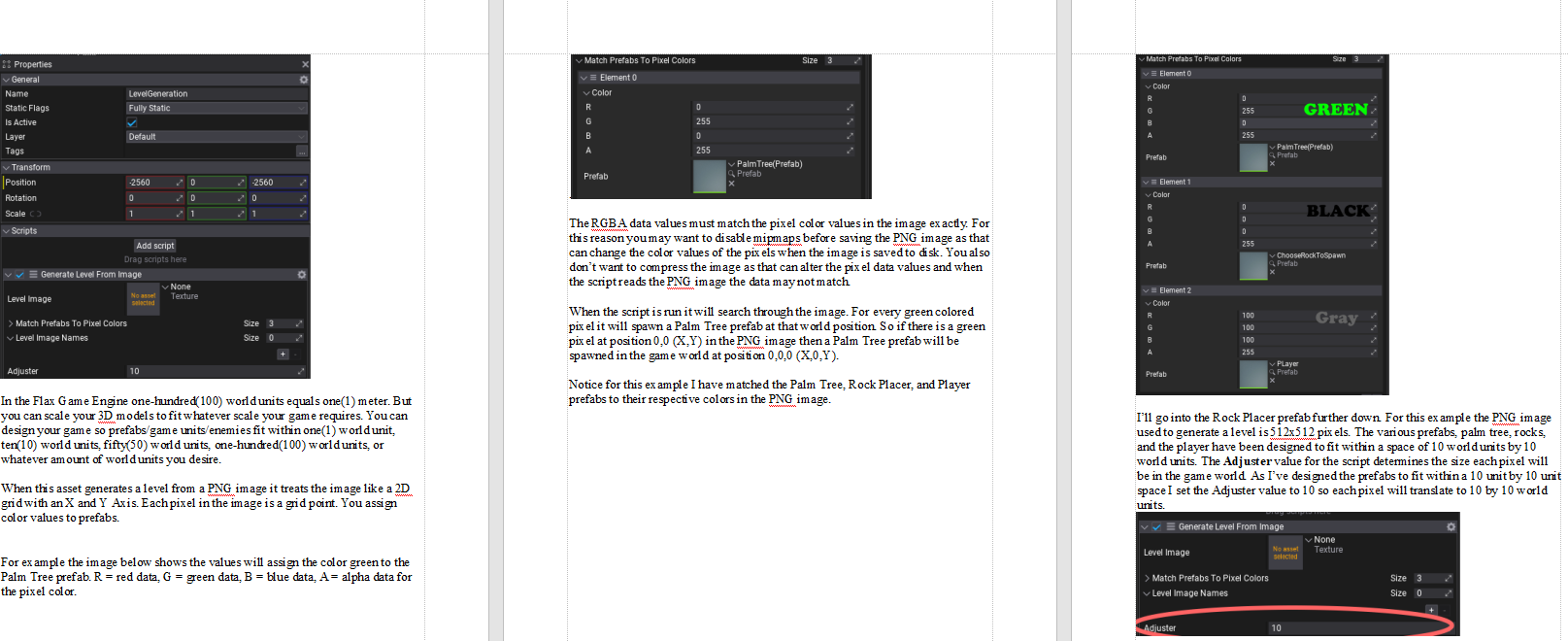
Generate A Level From A PNG Image
When this asset generates a level from a PNG image it treats the image like a 2D grid with an X and Y axis. Each pixel in the image is a grid point. You assign color values to prefabs. When the image is read by the game if a pixel color matches the color assigned to a prefab the pixel coordinate in the image is translated to game world coordinates and the assigned prefab is spawned at the appropriate location. This asset also allows you to set the size, in game world units, of each pixel. So each grid point/pixel of the image can be set to 1 world unit in size to 100 world units in size, or more.
Grid System For Placing Prefabs
This asset is designed for placing prefabs while a game is running. It’s useful for an RTS game when you have enough resources to place base buildings. Or for an open world game for laying down blocks to construct a larger structure. Or for placing available units in position right before a battle begins! Of course you would have to program all those game mechanics in yourself. This asset simply provides a grid and an example UI script along with code for placing prefabs during gameplay using a grid layout. The grid can be enabled/disabled. Any prefabs placed while the grid is enabled will remain visible and active in the game world when the grid is disabled. The asset makes it easy to provide your own grid cell visuals. Also included in the UI is sliders and code for rotating the camera’s Y and X axis.
You will most likely find ways to improve upon these assets. Use your imagination and have fun!