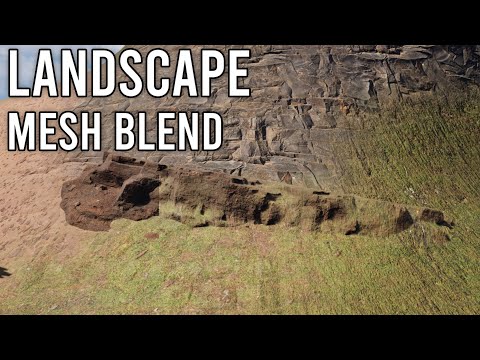
Trying to learn how ' mesh blend ' shaders work to create better terrains

have found another tutorial for ’ mesh blend ', or really thinking of how this could be done in Flax Engine

from what could tell this video that’s for Unreal Engine talks of

– absolute world height

– word space vectors

and that this method doesn’t make certain areas on the meshes invisible so one could see the background meshes, or more paints the surrounding textures on the 3D object one wishes to blend
this is very advanced stuff that really helps video games look like movies, and to get the last ’ ultra pro look ', or not sure anyone knows a good way of making this work in Flax Engine, and that it could also help artists make a ton of money from their works, etc

it can be done by making the rock or whatever transparent and then sampling the colors in it, i can try to make an example later today im at school right now

1 Like

there was another coder that might have known how to do this, or however think might have scared him away, and suggested one could create an almost Unreal Engine level effect, and forgot to say that Flax Engine one could do these things

make a free shader, or sort of take 0 $$ more to get started, and a demo of mesh blending

then perhaps a 10 - 15 $$ semi pro shader that could be sold on itch io

or last a 30 - 40 $$ really cool ’ Unreal level ’ shader with a ton of options to be sold

and that Flax Engine is sort of commercial beyond a certain point, and all kinds of people could make content for free, or then to very expensive stuff, and that it’s a truly wonderful program because of that, or he could even make cool money from coding something like this for the community

it doesn’t matter, or thought it was nice to say, and perhaps it got too serious over the money to even finish, or have been feeling very sorry since even say that, and more wanted to see a really cool result, or sort of with ’ pro ’ settings, and like from more cool devs that are on youtube

:sunglasses: :heart:

i’ll make one free, but, it will be unreal quality if it works (in theory it would)

1 Like

what i plan on doing is setting object bend mode to transparent, then i would get the scene depth and out it up to a power, multiply that with the objects pbr, then one minus that power (or smoothstepped maybe) texture and multiply it with the scene color and scene normals, to make it look good i need to perform operation on that scene color so it doesnt just look transparent and the blended texture is not affected by perspective, idk how to do this but i could figure it out

1 Like

sounds totally awesome, and can’t wait to see if you have demo screenshots later

this almost makes video games look like movies, or the dude that has created ’ Mesh Blend ’ for Unreal Engine takes 100 $$ for the code

( wait, and there’s two grades of payment that didn’t notice, or it’s so useful that he takes 1000 $$ for the large studio edition, and it’s sort very cool to most level designers, or artists that wish to hide seams between meshes, and to work at the AAAA - level also )

getting this for Flax Engine could be so cool, or imho the only thing that could look even better than RTX, and not even sure how to do this, etc

:smiley: :beers:

so my idea, was no work, if i can get the terrains heightmap, it would be possibel, idk how to do that, and in unreal engein tehy use virtual textur fo that

1 Like

o i can jus render the depth texture to ortho cam, i will try that

1 Like

it will actualy take a lot of work becuz i need the splatmap and texture and pbr data from the terrain

1 Like

from what could tell it’s that way, and to correctly paint the textures from surrounding objects one needs either to make them triplanar, or somehow fit from all directions, and that perhaps Flax Engine needs new nodes, or shader logic to get this done was what thinking

?!??

you can make triplanar yourself, its not too complicated just some uv work, there are lots of documentation on how to make this

1 Like

Flax Engine already has triplanar textures, or it’s a node that’s in the shader editor, and sort of where one works with materials, or however not sure how to find the places on one mesh where it overlaps with another, and really want to see the program get movie - star settings, or if people want to make the ultra next gen stuff, and think Flax Engine deserves at least that

:smiley: :100:

tbh a total fan of this engine, or love everything they’re working on, and simply hope it turns into everything they wish for, or also can’t wait for 1.12, and have even been reading the github milestone to have an idea of all the cool stuff, or however it looks mostly like simple bug fixes, and then user experience, or that it’s sort of a ’ quality of life ’ release to not see any super cool new features at least for now

here’s an idea of how far they’ve gotten, and soon to have another hyper amazing edition of the program, or they usually have awesome release notes, and then to think of all the cool things one could make, or have a ton of AAA - video games that want to finish of course

from the ACTUAL ENGINE PAGE itself that it looks to be maintenance bugs dot dot

1 Like

i have a lot of computer science homework today, so i probably wont get to this, but i suggest you follow this tutorial Simple Terrain-Mesh Blending - Advanced Gamedev Tutorials its for unity, but it uses shader graph so it should be easy to understand, all you need is terrain heightmap

1 Like

think know of how that works, and that the idea is to place the mesh blending at the level of the height of the terrain, or except it doesn’t work for other meshes from what know, and have been thinking of making something that works for more than one background mesh

what have learned is that this is rather advanced stuff, or that perhaps there’s a reason it costs so much money for a pro edition for the Unreal Engine, and however gonna continue to research this if get the chance, or also #thx very much for the link, and want to see if could at least code that system first, or later some of the more cool stuff, and that works for every mesh on the screen

best of luck with computer sciences, or myself studied to be an engineer, and we had Turbo Pascal to program sort of lab tech, or rather custom X - ray scanners at a basic level, and also hope you get good grades